Building Intelligent Java Apps with Spring AI and OpenAI
For years, adding AI to a Java application meant shelling out to a Python service or hand-rolling HTTP calls to a model provider. Spring AI changes that. It gives Spring Boot developers a familiar, portable abstraction over large language models — the same way Spring Data abstracts databases — so you can add chat, summarisation, classification, and retrieval-augmented generation without leaving the JVM.
This guide walks through the integration end to end: configuring a model, calling it from a service, and grounding answers in your own data with a vector store.
1. Add the dependency and configure a model
Spring AI ships a starter per provider. For OpenAI you add the starter and set an API key; switching to Azure OpenAI, Ollama, or a self-hosted model later is mostly a config change, not a code change. That portability is the whole point — your business logic talks to a ChatClient, not to a vendor SDK.
// build.gradle
implementation 'org.springframework.ai:spring-ai-openai-spring-boot-starter'

# application.yml
spring:
  ai:
    openai:
      api-key: ${OPENAI_API_KEY}
      chat:
        options:
          model: gpt-4o-mini
          temperature: 0.2
Keep the API key in an environment variable or a secrets manager — never in source control. A low temperature (0.0–0.3) keeps answers deterministic, which matters for anything customer-facing.
2. Call the model from a service
The ChatClient is a fluent, injectable bean. A system prompt sets the assistant's role and guardrails; the user message carries the request. Because it's an ordinary Spring bean, it's trivial to unit-test with a mocked client.
@Service
public class SupportAssistant {
  private final ChatClient chat;

  public SupportAssistant(ChatClient.Builder builder) {
    this.chat = builder
      .defaultSystem("You are a concise support agent for an e-commerce platform.")
      .build();
  }

  public String answer(String question) {
    return chat.prompt()
      .user(question)
      .call()
      .content();
  }
}
3. Ground answers in your data with RAG
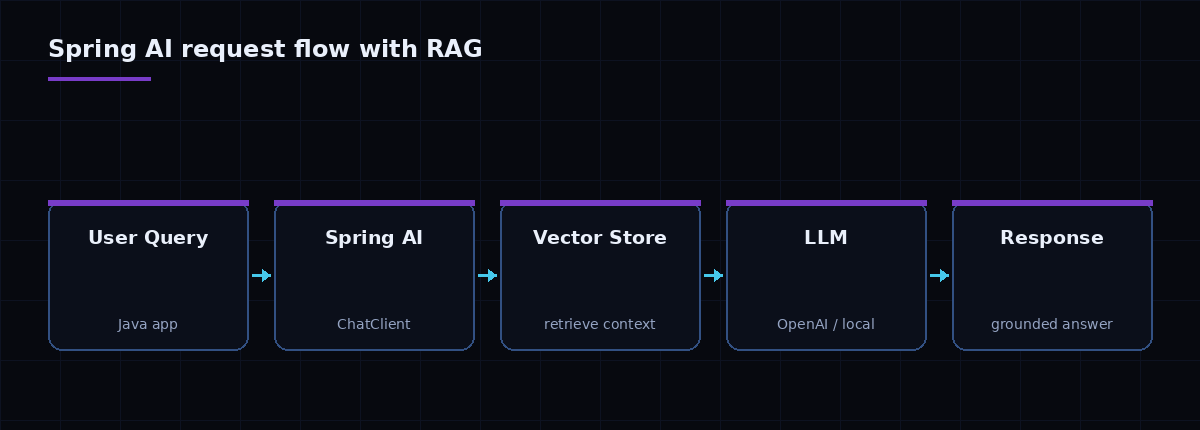
A raw LLM only knows its training data — it can't see your product catalogue, docs, or tickets, and it will confidently invent answers it doesn't have. Retrieval-augmented generation fixes this: you embed your documents into a vector store, retrieve the most relevant chunks for each question, and pass them to the model as context.
Spring AI provides a VectorStore abstraction with implementations for PGVector, Elasticsearch, Redis, and more. The flow is:
- Ingest: split documents into chunks, generate embeddings, and store them.
- Retrieve: embed the user's question and run a similarity search for the top-k chunks.
- Augment: inject those chunks into the prompt so the model answers from facts, with citations.
String context = vectorStore
    .similaritySearch(SearchRequest.query(question).withTopK(4))
    .stream().map(Document::getText)
    .collect(Collectors.joining("\n---\n"));

return chat.prompt()
    .system("Answer only from the context. If unsure, say so.")
    .user(u -> u.text("Context:\n{ctx}\n\nQuestion: {q}")
               .param("ctx", context).param("q", question))
    .call().content();
This pattern is exactly how we built semantic search and an AI sourcing assistant for a long-standing client — see the OptaAI case study for the production version.
4. Make it production-ready
A demo that calls a model is easy; a reliable service is the real work. The things that matter in production:
- Timeouts and retries on the model call, with a graceful fallback when the provider is slow or down.
- Token budgeting — cap context size, because every retrieved chunk costs tokens and latency.
- Caching of embeddings and frequent answers to cut cost.
- Evaluation — log prompts and responses, and score answer quality against a fixed test set before each release.
- Guardrails — validate and sanitise model output before it touches downstream systems.
Key takeaways
- Spring AI lets Java teams add LLM features with familiar Spring idioms and provider portability.
- Use a
ChatClientfor chat and aVectorStorefor RAG to ground answers in your own data. - The hard part is production hardening — timeouts, token budgets, caching, and evaluation.
Want help putting Spring AI into your application? We do exactly this. Talk to an architect, explore our Spring AI services, or see how the same RAG pattern grounds support and knowledge-base assistants.
Related articles
Event-Driven Architecture with Apache Kafka and Spring Boot
Event-driven architecture decouples services and lets them scale independently — but only if you get topics, idempotency, and ordering right. A practical field guide with Spring Boot.
Spring Boot Microservices: A Production Architecture Guide
Microservices are an organisational and operational choice as much as a technical one. Here's how to structure Spring Boot services so they stay independent, resilient, and observable.